Booking widget: real slots, booked on the spot.
Part of the AI Front Desk. Visitors pick from live openings in your Google or Outlook calendar - from the chat, a Book button, or its own booking page - and get confirmed instantly.
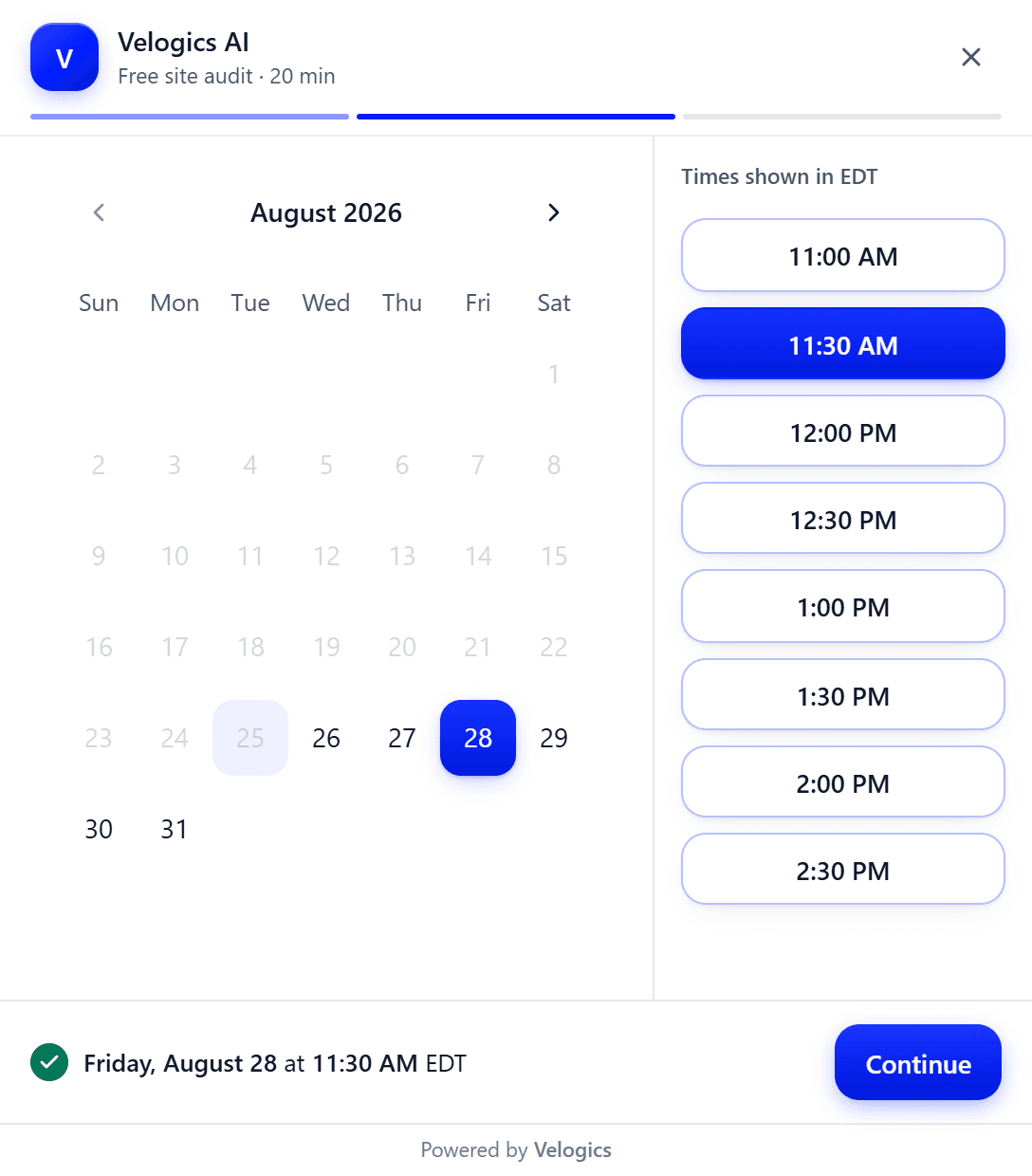
A real screenshot of the live widget - yours carries your name and colours.
What is the Velogics booking widget?
The booking widget lets a visitor book a real appointment on your website without emailing anyone. It reads live availability from your connected Google Calendar or Outlook, shows the open slots for the service they picked in their own timezone, and writes the booking back the moment they confirm.
It runs as a Book button, a popup, a shareable booking page, or inside the AI Chatbot conversation. It is part of the AI Front Desk, included in the $388 a month plan.
What changes when it's on.
- Booking happens over phone tag and email chains
- After-hours visitors can't book at all
- Manual calendar entries drift out of sync
- Visitors self-book from live availability
- Bookings land 24/7, in the visitor's timezone
- Calendar and CRM stay in sync automatically
What it takes to book a real appointment.
Live availability
Shows real open slots from your connected Google or Outlook calendar - re-checked the moment someone confirms, so a taken slot can't double-book.
Your services & durations
Each service has its own length and description - a 20-minute audit books differently than a 90-minute onboarding.
Books inside the chat
The AI Chatbot offers the same live slots mid-conversation, so a chat turns into a confirmed appointment.
A button, a popup, or a page
Run it as a Book button on your site, a popup widget, or a shareable standalone booking page.
Instant confirmation
The moment they book it's confirmed, with an add-to-calendar link - no email back-and-forth.
Calendar & CRM stay in sync
Every booking lands on your calendar and the lead is tagged in Follow Up Boss.
Where do the times actually come from?
From the calendar you already keep. The widget reads availability live from the Google Calendar or Outlook account you connect, so the openings a visitor sees are the gaps in your real week rather than a schedule you have to maintain in a second place.
That is the whole reason it is worth having. A booking page that runs on its own copy of your availability is a booking page that will eventually sell a slot you are already standing in a customer's kitchen for. If your calendar changes, the openings change with it, without you telling anything.
Each service carries its own duration, so a twenty minute site audit and a ninety minute onboarding session do not carve the same hole in your day. The visitor picks the service first and the times they are then offered are the ones that actually fit it.
What stops two people booking the same slot?
The gap between seeing a time and confirming it. Somebody can sit on the slot list for ten minutes while a phone call books the same time, and any booking tool that trusts the list it painted a moment ago will happily double-book you.
So the slot is re-checked against your calendar at the moment of confirmation, not just when the list was drawn. If it has gone in the meantime the booking is refused and the visitor is shown what is still open, rather than being told they are booked and leaving you to find out later.
Times are shown in the visitor's own timezone, with the zone named on screen. That matters more than it sounds: the most common double-booking is not two people at once, it is one person confidently booking 9am in a timezone that is not yours.
Does it have to be its own page?
No, and the choice is worth making deliberately. It runs as a Book button in your navigation, as a popup over whatever page somebody is already reading, as a standalone booking page you can paste into an email or a text, and inside the chatbot conversation.
The in-chat version is the one that changes results the most, because it removes the step where an interested person has to go and find the booking page. Somebody asking the chatbot whether you cover their area can be offered a time in the same conversation, and confirm without ever leaving it.
All four are the same widget reading the same calendar. They look the same as each other and as the chat beside them, because a visitor who gets handed from a chat to something that looks like a different company's checkout is a visitor who stops to wonder why.
Where a booking can start, and what it takes.
Same widget, same calendar, four front doors. The column that matters is the last one.
| Where it starts | What the visitor does | What you get |
|---|---|---|
| A Book button on your site | Picks a service, a day and a time, then leaves a name and contact details. | The appointment on your calendar and the lead in Follow Up Boss. |
| Inside a chat | Asks a question, gets offered real times in the conversation, and confirms without leaving it. | The same appointment, plus the transcript of what they asked before booking. |
| A link you send | Opens the standalone booking page from an email or a text and books from there. | The same appointment. Useful for quoting somebody who called you. |
| A slot that just got taken | Confirms a time that went while they were deciding. | Nothing, deliberately. The booking is refused and they are shown what is still open. |
Set it up once. It runs itself.
They pick a service
Your services, each with its own duration.
They pick a real slot
Live openings from your calendar, shown in their timezone.
They confirm
Name and contact details - one tap.
It's on your calendar
Confirmed, synced, and the lead is in your CRM.
Built for businesses that sell time.
Service businesses
Quotes, site visits, and jobs booked while you're on the tools.
Clinics & consultations
Appointment types with real durations, booked day or night.
Anyone selling time
If your week runs on a calendar, let the website fill it.
Before you hand it your calendar.
1Which calendars does it work with?
Google Calendar and Outlook, both natively. Availability is read live and the booking is written back in real time, so the two never drift apart. Anything else is a custom integration rather than a switch to flip - we would scope and quote it per project instead of implying there is a connector waiting.
2Can people book from inside the chat?
Yes, and it is the version worth turning on first. The AI Chatbot offers the same live slots mid-conversation, so somebody who came to ask a question can confirm a time without going to find a booking page. The widget also runs on its own as a Book button, a popup, or a shareable booking page.
3What stops a slot being booked twice?
A re-check at the moment of confirmation. Slots are shown in the visitor's own timezone with the zone named on screen, and when they confirm, the time is checked against your calendar again rather than trusted from when the list was drawn. If it went in the meantime the booking is refused and they are shown what is still open.
4What does the customer get after booking?
A confirmation on the spot with an add-to-calendar link, so the appointment is in their calendar as well as yours. Nobody is left waiting on a confirmation email to find out whether the time they picked was real.
5Is it part of the AI Front Desk?
Yes. Booking is bundled into the AI Front Desk and has no separate price, which is why none appears on this page. It shares the calendar connection, the knowledge base and the Follow Up Boss connection with the chatbot, the forms, and the AI Receptionist if you add that - so the receptionist books from the same availability the website does.
See Booking widget work on your business.
Get a quick demo on your own numbers - or talk to Ana right now.
Or call Ana now: +1 (613) 383-5521